
Sony headphone controls for Windows
XM Studio
Control noise cancelling, ambient sound and equalizer settings for supported Sony headphones and earbuds from your Windows PC.
- Windows 10 / 11 · x64
- Bluetooth required
- Microsoft Store distribution
Coming soon to the Microsoft Store. Public release is being prepared.
View screenshots
Application screenshots
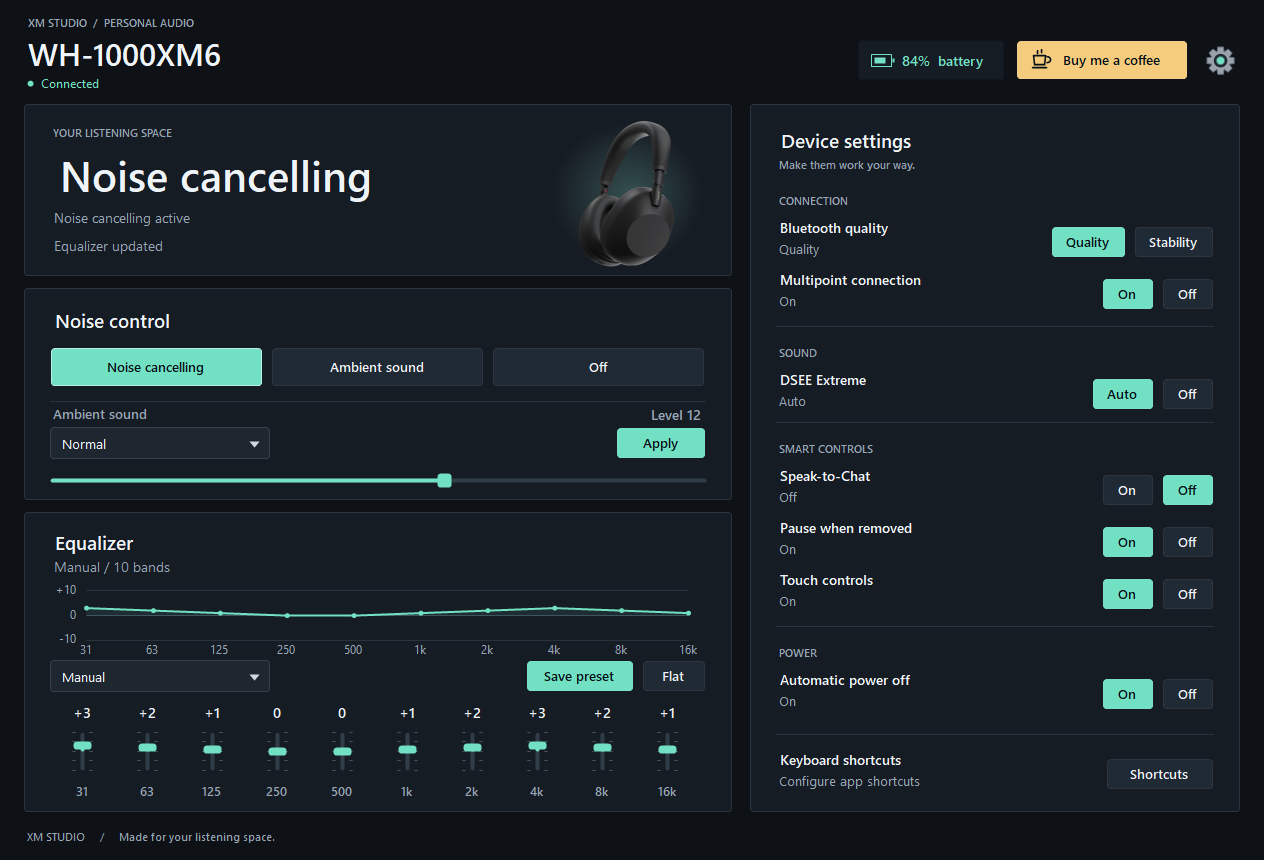
Real application UI rendered by the preview test harness with example device, battery and equalizer values. These captures do not represent a live Bluetooth session. Select an image to open it at full size.
About XM Studio
XM Studio brings headphone controls into a Windows desktop application, with battery status, a compact system tray menu and configurable global keyboard shortcuts.
The app includes device profiles for WH-1000XM5, WF-1000XM5, WH-1000XM6 and WF-1000XM6. Pair and connect your headphones in Windows Bluetooth settings before opening XM Studio. Available controls depend on the model, firmware and the Bluetooth connection.
XM Studio communicates locally with your headphones over Bluetooth. It does not record audio, require an app account or upload headphone settings. The interface is in English. XM Studio is an independent application by mablook and is not affiliated with or endorsed by Sony.
XM Studio features
Noise and ambient sound
Switch between noise cancelling, ambient sound and off. Adjust the ambient sound level and voice focus where supported.
Equalizer and presets
Adjust the available equalizer bands, select a preset or save settings to a supported user preset. The layout adapts to the device’s equalizer.
Device settings
Access supported controls for Bluetooth connection quality, multipoint, DSEE Extreme, Speak-to-Chat, wearing detection, touch controls and automatic power off.
Battery and tray controls
See battery status, receive a low-battery notification and change noise modes from the system tray.
Keyboard shortcuts
Configure global shortcuts for headphone actions. Reopening XM Studio restores the running window instead of adding another tray instance.
Windows display scaling
Use the dark interface at different window sizes and display scales, including changes between monitors.
Questions about XM Studio
Which devices can I use?
The app includes profiles for Sony WH-1000XM5, WF-1000XM5, WH-1000XM6 and WF-1000XM6. Controls can vary with the model and firmware. Other models are not listed as supported.
What does my PC need?
A Windows x64 PC running Windows 10 version 1809 or later, or Windows 11, with Bluetooth and a supported headset already paired and connected. The interface is in English.
Can I download XM Studio now?
The Microsoft Store release is being prepared. A download link will appear here after public availability has been confirmed.
Does the app record audio or upload device data?
No. XM Studio sends control commands over Bluetooth and reads device status. Preferences and diagnostic logs stay on the computer. The privacy policy explains the information used and the optional external donation link.
Is this an official Sony app?
No. XM Studio is an independent application by mablook. Sony and the device names are trademarks of their respective owners; no affiliation or endorsement is claimed.
Release in preparation
Coming to the Microsoft Store
The public Microsoft Store release is being prepared. The download link will be added here when it is available.
Privacy and support
Read how the app handles your information, or contact me for support and product questions.